



















经《The Spectrum Monitor》编辑Ken Reitz的慷慨许可重新出版(原文发表于2026年8月,《The Spectrum Monitor》第13卷第8期)。
由Robert Gulley撰写:K4PKM tinySA Ultra是几年前推出的tinySA的升级版[详见Bob Grove在2021年1月出版的《TSM评论:tinySA频谱分析仪》文章W8JHD。顾名思义,这款设备主要是一款频谱分析仪,同时还能充当信号发生器,而且非常便于携带。由于其在外观上与NanoVNA非常相似,因此很容易被误认为是同一品牌的另一种天线分析器而已。
与NanoVNA类似,tinySA Ultra其实是一种辅助设备,可以帮助定位信号、分析其特性,并履行许多与更大型、成本更高的频谱分析仪相同的功能。此外,通过使用随附的信号发生器,用户可以在现场使用这种小型设备,而不必局限于仅在测试台上工作。
我在本文中想要讨论的是该设备的部分功能,但绝不是要介绍如何使用它。您应该大量参考tinySA的官方使用说明页面(https://tinysa.org/wiki/pmwiki.php?n=Main.HomePage)。我建议您观看一些关于tinySA Ultra在实际使用中的视频教程。开发者在他的YouTube频道上发布了一些简短的操作指南视频,可以在这里找到:https://www.youtube.com/playlist?list=PL5ZELMM2xseNkwVBtyAG00uZevwWUd-VIg。这个设备是由Radioddity提供的用于评测的,我的评测旨在客观呈现设备的优缺点,与Radioddity并无任何关联。另外,需要说明的是,这些只是我的个人观点和评价,没有任何人工智能技术被用来生成这些内容。无论好坏,这些都属于我个人的意见。那么,让我们开始吧!
盒子里是什么
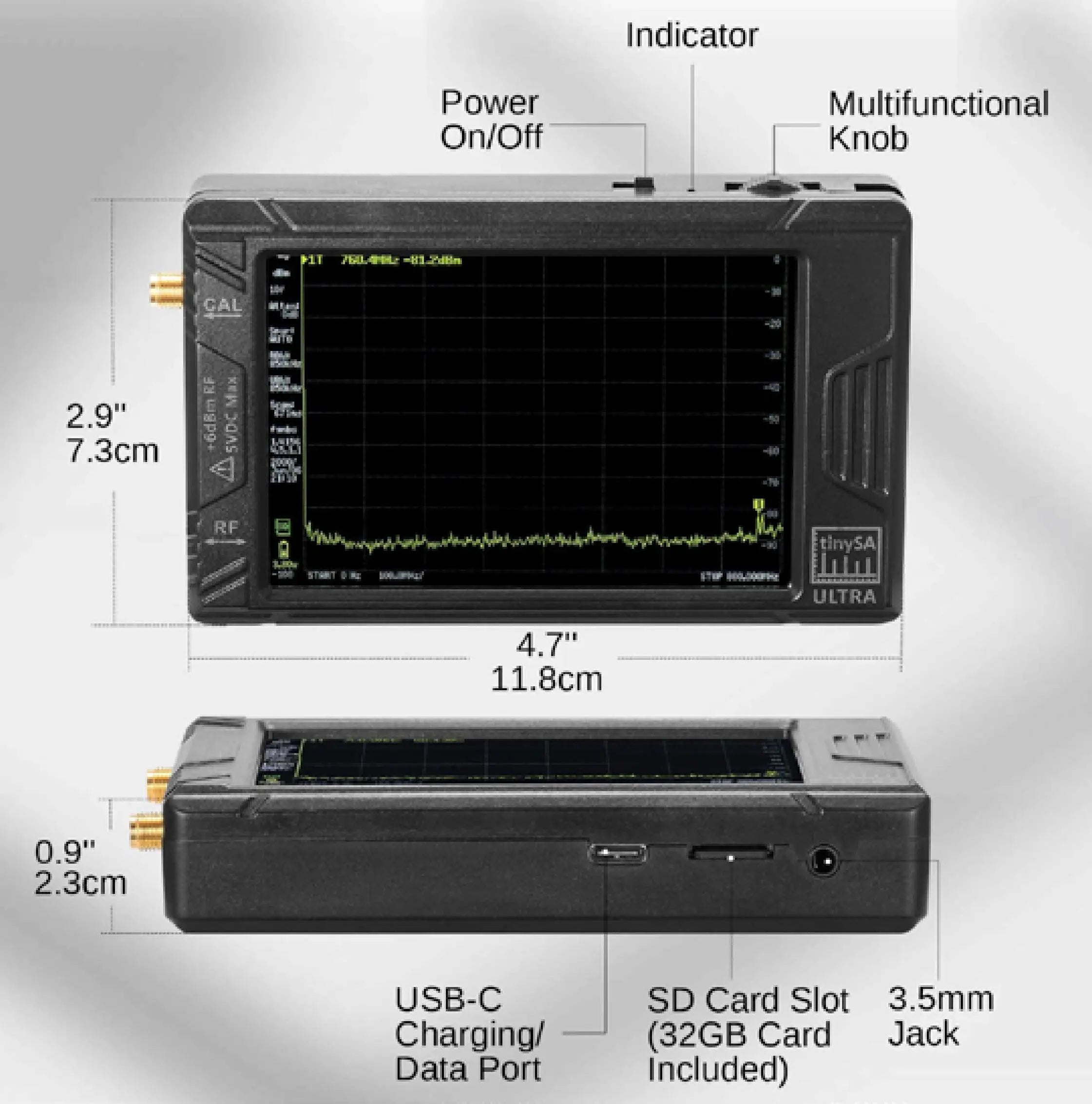
该设备被包装在一个结实且美观的盒子里,包装非常出色,能够很好地保护内部组件。除了设备本身之外,还附带了两根带有双型SMA连接器的跳线,以及一个SMA接口、可伸缩天线、USB-C数据线以及一支触控笔。与许多需要额外购买Micro SD内存卡的设备不同,这款设备的存储插槽中已经内置了32GB的内存卡。此外,还附有一条带有吉他拨片的挂带,在紧急情况下可以当作触控笔使用。
tinySA Ultra ZS405基本规格
(来自tinySA维基页面)
- 屏幕尺寸为4英寸
- 该频谱分析器适用于0.1至800 MHz的频率范围;在启用“超频模式”的情况下,可分析高达5.3 GHz的频率。其测量精度可达6 GHz。能够检测频率高达12 GHz的信号。
- 该信号发生器具备正弦波输出功能,频率范围可达0.1至800MHz;同时还能产生高达4.4GHz的方波输出,或者在不作为频谱分析仪使用的情况下,输出强度高达5.3 GHz的射频测试信号。
- 可切换分辨率的带通滤波器,频率范围从200赫兹到850 kHz
- 内置20分贝可选低噪声放大器
- 彩色显示屏能够显示最高450个数据点,可以无缝覆盖整个频率范围。
- 配有MicroSD卡插槽,可用于存储测量数据、设置信息以及屏幕截图。
- 输入步长:从0 dB到31 dB(无法与低噪声放大器一起使用)。
- 内置的校准信号发生器,用于自动自检以及低阶输入信号的校准操作。
- 通过USB连接到电脑后,它就可以成为一个由电脑控制的频谱分析仪或信号发生器了。
- 可充电电池,至少可以持续两小时的使用时间,非常方便携带。
- 最大输入级别增加10 dBm。
- 该生成器函数不能用作跟踪生成器,因为无法同时使用频谱分析器和生成器函数。
频谱分析模式
如前所述,这个tinySA ultra有两种基本工作模式:一种是对频谱进行分析的模式,另一种则是产生信号的功能模式。我先来了解一下对频谱进行分析的模式,然后再看看产生信号的功能模式。
当打开tinySA ultra时,系统会默认进入频谱分析模式。连接随附的天线后,你可以看到根据所处位置而变化的环境噪声水平。例如,如果你在客厅内使用该设备,可能会发现噪声水平非常低,偶尔会出现一些波动。设备内置了自动标记功能,能够显示出现波动的位置,并且标记的位置表示信号最强的地方。在设备的顶部,你可以看到该波动的频率和声级数值。你还可以通过菜单选项来设置设备,让分析仪在所有达到指定噪声水平的波动位置上都添加标记。
操作
我建议您先扫描包装材料上印有的二维码,或者访问tinySA.org的官方网站,按照说明进行启动自检和校准操作。这样可以确保设备能够正确校准,同时能够在测试结果出来之前发现任何问题。此外,您还可以在这里找到关于如何激活“超频模式”的说明。
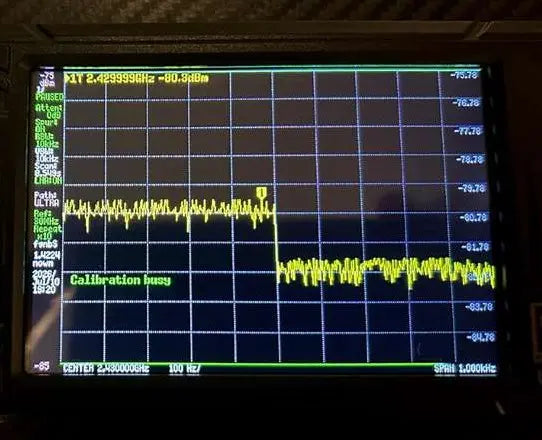
以下是关于自检和校准过程的说明。在进行自检时,你应该会看到一条消息,表示自检成功,随后还会出现一条提示“触摸屏幕以继续”的消息。如果过程中出现任何问题,请不要担心设备出现了故障,而是先执行校准操作,然后再重新进行自检。这样通常可以解决相关问题。请注意,并非每次使用设备都需要进行校准检查。通常这种操作是首次使用设备时进行的,或者当你怀疑设备因某种原因而失去校准状态时才需要进行。自检也是如此。
请注意,总共有两个校准过程。其中一个是从100 kHz到5.34 GHz的校准过程,另一个则是针对超过5.34 GHz的情况进行的校准。如果您并不打算使用在5.34 GHz以上的微小值,那么可以完全忽略第二个校准过程。
根据说明,你需要将一根跨接电缆连接到两个端口上:RF端口和CAL端口。这为一个循环操作,使得该设备能够自我测试并相应地进行调整。当校准完成后,你会收到一条提示信息,同时也会看到“触摸屏幕以继续”的指令,这与自我测试时的操作类似。
局部噪声
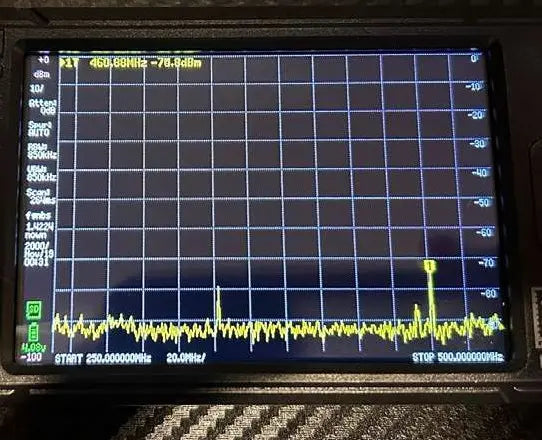
目前,在我的无线电室里,测得的环境噪声水平约为-90 dBm分贝(以毫瓦为单位),其中有一个峰值达到了460.88 MHz。请注意,我将频谱分析器的频率范围限定在250 MHz到500 MHz之间,这样就能显示出两个较小的峰值。通过缩小搜索范围,可以做到以下几点:首先,扫描速度会更快;其次,显示屏上显示的信号范围也会更广,从而让设备能够提供更精确的读数。
顺便说一下,虽然这一点似乎不言而喻,但这个设备的精度远远无法与那些价格高达数千美元的同类设备相媲美。如果你需要最精确的测量结果,那么很明显,这个设备并不适合你。不过,对于短波通信、业余无线电以及基本的校准工作来说,这个设备完全能够提供足够好的测量结果。而且,它还具有非常便携的特点哦!
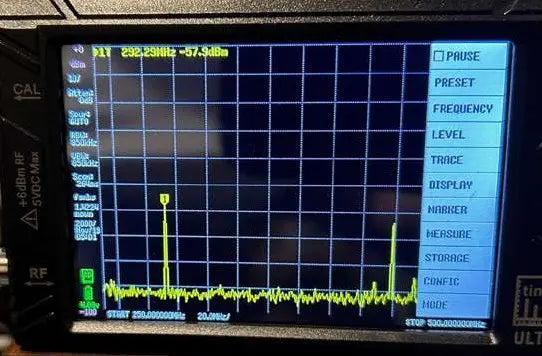
该软件的一个不错的功能是暂停功能,它可以帮助用户识别特定的频率或频率范围,或者更深入地研究信号的特性。在暂停状态下,还可以使用顶部的小滚轮来滚动查看各个频率点,从而找出其他峰值以及它们的信号强度和位置。如果你想保存当前的屏幕截图,可以进入菜单并点击“保存捕获”。通过菜单,你还可以选择显示多个标记点。如果同时接收到两个或三个信号,可以调出菜单,选择2、4、6或8个标记点进行显示。
首次测试/激活过程
你可以立即进行一个简单的测试,比如测量你的钥匙扣的频率。我测量了一下,结果显示频率为434 MHz。这是一个简单的测试,但能有效地判断该设备识别信号的能力如何(而且首次测试时不会造成tinySA过载的风险!)。
那么,当你测试一个手持式无线电设备时,会发生什么呢?虽然可以通过提供的电缆直接将无线电设备连接到射频输入接口,但即使是从手持式设备输出的功率,也可能对设备造成损坏。除非在无线电设备和设备之间添加衰减器(或者根据需要使用多个衰减器),否则就有可能发生这种情况。
tinySA Ultra能够处理大约6 dBm的输入信号强度。如果输入功率超过这个数值,就有可能损坏设备。不过,如果你在距离设备10到15英尺的地方,使用低功率模式进行测试,并且连接了随设备附带的天线,那么你应该能够获得足够的测量数据,从而确定主要频率以及一个或多个谐波的频率,前提是扫描范围能够覆盖所有可能的谐波频率。
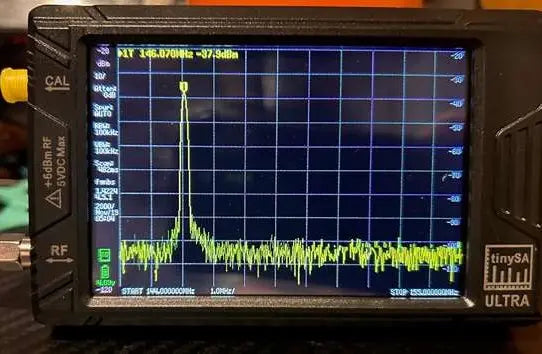
如果您希望直接将发射器连接到tinySA Ultra设备上,请参考“安全问题”部分下方的说明,了解所需的衰减值。例如,我手头有一台低功耗手持设备(Yaesu VX-3 1.5W),其设置频率为146.670 MHz。通过调整偏移量后,该设备的发射频率变为146.070。
如您在图片中所示,基频为146.070 MHz,信号强度为-37.9 dBm。在第二张图片中,可以看到二次谐波的频率为292.29 MHz,信号强度为-57.9 dBm。二次谐波的频率是基础频率的两倍,因此,如果您将分析器的检测频率设置为该频率的两倍以上,那么tinySA就会显示出二次谐波信号,就像这里所示的那样。
这个分析器的一个非常实用的功能是:你可以直接通过菜单中选择“测量”选项,然后点击“谐波”来测量输入信号的多个谐波成分。之后,你可以将无线电发射信号设定为中心频率,并指定在基频上下多远的位置进行测量。这样就能同时观察到多个谐波成分了。
光谱纯度/偏差
对于业余无线电操作员来说,tinySA Ultra还有一个非常实用的功能:它可以检测发射信号的频谱纯净度以及信号偏差情况。这一功能同样适用于GMRS和家庭广播服务所使用的无线电设备。这有助于确保发射的信号保持最纯净的状态,避免产生干扰信号,从而符合FCC的相关规定。
对于调频广播来说,频率偏差会被优化,以确保语音清晰可辨。通常,频率偏差值为5 kHz,这意味着传输的信号宽度大约为5 kHz,这样的信号足以承载语音、数字信号等。通过中继器或单工模式,这些信号可以轻松地被接收端理解。
简单来说,我们使用5个偏差值来测量信号的清晰度。这意味着需要额外的3个偏差值,从而使得信号范围的宽度达到8个偏差值。由于这个数值可以有正负之分,所以我们通常会将其翻倍,也就是16个偏差值。此外,我们还希望有稍微多余的空间来覆盖某些字母发出的高音,比如“S”或“P”这样的发音。因此,在测试信号清晰度时,我们希望信号强度能保持在大约18个偏差值以内,这样就能保证约95%的清晰度。好了,这些技术性的描述就到此为止吧!关键点是,我们可以利用这种设备来测量信号的清晰度,从而判断信号的质量如何。
显然,频谱分析器功能还包含许多其他特性,不过为了便于理解,我就只讨论这些基本功能吧。另外,我相信很多读者可能会发现这种功能有各种独特或未经测试的应用方式!
信号发生器模式
To switch from spectrum analyzer mode to the signal generator mode, you’ll tap on the “menu mode” button, and then select “signal generator.” The signal generator will start with a default setting of 10 MHz. This can be adjusted using the stylus by sliding back-and-forth to change the frequency, or, and more useful typically, tapping in the center and entering a specific frequency.
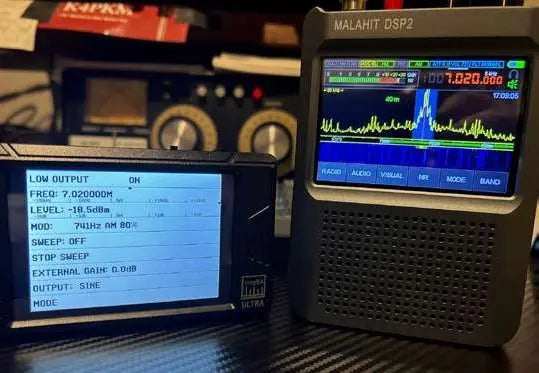
Beneath the frequency is the dBm setting, which can be adjusted in exactly the same way as the frequency. It defaults to the highest level of -17.5 dBm, and you can slide back-and-forth to set a general range, or tap the set option on the slider to enter a specific dBm.
You can modulate a tone in either AM or FM, set the frequency of modulation, depth, deviation, and even set a sweep generator to sweep along a certain frequency range. Again, all of this is explained in the wiki pages, and demonstrated by various YouTube videos. This is an overview of the analyzer/generator capabilities, and as such, we don’t want to get too deep in the weeds for this article.
测试信号发生器
An easy test of the signal generator is to set a frequency on the generator and match that on a radio receiver. Transmit the signal with the tinySA’s antenna connected and transmit the signal with the default -17 dBm signal setting on AM, remembering to set the radio receiver to the same mode. If you attach a simple short wire antenna to the receiver, or use a built-in telescopic whip with portable receivers, you should be able to hear a good strong signal at the designated frequency. If you reduce the dBm on the tinySA to something like -35 dBm, you should hear the signal weaken, just as if you were to move the tinySA antenna farther away from the receive antenna.
You can also connect the radio receiver directly to the tinySA and drop the dBm down to around -73 dBm, so as to receive an S9 signal on the radio. Again, we want to make sure we don’t overload the radio receiver by generating too strong of a signal from the tinySA. (If you wonder why I keep mentioning this, it is simply that all similar devices, even expensive spectrum analyzers, are designed to work with very low input power. Likewise, radios receiving signals through an antenna are receiving very weak-powered signals by the time the signal reaches them, even from shortwave stations around the world starting out with 100,000 watts.) If you want to test the radio above S9, you could add 20 or 25 dBm to increase the received strength at your receiver, by roughly the same amount. Likewise, if you reduce the signal strength using the dBm slider, you can see how low you can go before the receiver stops recognizing the generator’s signal.
To reach a level where the receiver cannot hear the signal at all may require an attenuator, depending on the receiver’s sensitivity. Of course, these are not hard and fast numbers, because your receiver’s meter may not be calibrated exactly, or you may see different results using different radios because of the variance between their respective meters.
The signal generator function is also great for tightening up the alignment of a receiver, particularly older units, or when building your own receiver. By injecting a known frequency at various points, receivers can be aligned to show accurate frequency displays.
一些额外的功能与用途介绍
- There is a speaker/headphone jack which allows you to listen in on a signal such as an FM modulated station or AM modulated station (broadcast or shortwave) when you turn on the low noise amplifier, or LNA. It’s not designed for impressive sound, but rather a down and dirty ability to hear a signal right from the unit.
- You can turn on a waterfall display, which can show you more information about various signals that are being received, much like modern SDR radios.
- RFI Tracking – The tinySA Ultra is very useful for tracking down radio frequency interference. One of the tricks for locating RFI is to attach a dummy load to the antenna connector so that you are isolating as many signals as possible from various sources like AM and FM radio stations, Wi-Fi, etc. When you are trying to track RFI in your shack or in your house, you do not want to have to figure out if what you are hearing is a legitimate signal.
- One thing many more advanced spectrum analyzers have is a tracking generator, which the tinySA does not have. However, I have seen plans on the internet for building one, so if that is of interest to you, you can do some research and possibly add that capability.
- You can also find tear-down videos on the internet, as well as videos from folks who have overloaded the unit and what they did to bring it back to life.
- For field work, I would recommend carrying both a NanoVNA and a tinySA Ultra in a case with various needed attachments. These two units combined will give you most, if not all, of the testing capability you will need to setup your radio and to make sure you are producing a clean signal, all while having minimal additional weight in your pack.
软件
There are several programs which can connect your device to a computer, which will allow you to operate on a larger screen. Not all features work through the software, but most of the main ones do. Of course, if you are out in the field, you may not want to carry the extra weight of a laptop, and so operating with just a stylus is perfectly fine as well. I have been using the tinySA software since it is the most common software being used to control the device, but you may like to try something else.
安全问题
在tinySA的维基页面中有关输入功率限制的相关内容:发射器与tinySA之间的衰减要求。
- For 100 W: between 60 and 70dB
- For 10 W: between 50 and 60dB
- For 1 W: between 40 and 50dB
The best approach is to ALWAYS use a 30 dB attenuator directly connected to the tinySA and to use power attenuators to reduce the output of the transmitter to the target input level of this 30dB attenuator, that is +10 dBm So, you will need these power attenuators
- For 100 W output: 30-40 dB
- For 10 W output: 20-30 dB
- For 1 W output: 10-20 dB
Thankfully, there are Power (in watts)-to-dBm calculators on the web if, like me, you do not remember the analog way of calculating these conversions. An excellent site is at: www.everythingrf.com/rf-calculators Also, the manufacturer recommends keeping the dust covers on the unit to avoid static discharge damage when not in use.
Pros and Cons
As I always do, below is a list of the Pros and Cons as I see them based on my experience with the tinySA Ultra. None of the cons are deal-breakers by any means, just mentioned as things of which to be aware.
Pros
- Portable, self-contained test instrument for use as a multi-featured spectrum analyzer and signal generator
- USB-C charging
- Headphone/speaker jack for listening to demodulated signals
- Ability to go into “Level” and “Unit” to change from dBm to watts to measure power units in watts
- The ability to flip the screen display so that the USB cable can be positioned at the top, making it easier to work with it when tethered to a computer.
- Using either the tinySA Ultra or the tinySA.app you can grab screen captures and save them either to the included memory card, or to your computer when connected and using the app. You can also load/save previous captures, traces, settings and more.
- Software operation – With the tinySA software, you are not limited to the small 4-inch screen of the unit, so the spectrum analyzer display can be much larger.
Cons
- All of the units I have used or seen used seem to require tapping toward the bottom of a menu item to activate the menu choice. It’s not really a true “con” once you use the device for a bit, but it takes some getting used to.
- As you move the included antenna around it can become slightly loose. To be fair, this is a rather common problem with small antennas having a SMA connection. It’s not so much a fault with the radio, but rather something of which to be aware.
- On my unit, the USB-C cable is a very snug fit on both ends. This can be a plus in that the connections will not come loose easily, but also a potential negative if one is not careful plugging in the connections. Since it is an almost ubiquitous connection, I may use another cable and keep this one in reserve.
- When entering information on the popup keypad, I have noticed the touch sensitivity is such that one can easily enter a doubled number without meaning to (e.g. 77 instead of 7). The solution is to carefully check your numbers before hitting enter. (Physician, heal thyself?!)
Conclusions
This has been a very brief overview of the capabilities of the tinySA Ultra. As mentioned above, the wiki pages, online user videos, and especially the short videos produced by the developer of the tinySA will be of great help in getting the most from the device.
As both a shortwave listener and an amateur radio operator (and occasional builder), I can see a number of uses this device can fill without having to spend massive amounts of money on bench testing devices. Shortwave listeners can tighten up receivers using the signal generator function; use the spectrum analyzer/waterfall functions to see what signals are coming in on a given band (very helpful for non-SDR receivers), and track local RFI sources that might not be obvious upon casual listening.
Amateur radio operators can test transmitters for splatter and deviation, harmonic levels, as well as finding signals through the analyzer and waterfall functions. If you’re building your own equipment for amateur radio operation, a number of the tinySA Ultra features will come in handy for testing along the way. And if you do any amateur radio satellite work, or just like to listen in, the large frequency range of the tinySA Ultra can be a great way to identify signals out in the field. This device, along with one of the NanoVNA models, makes for a great POTA/SOTA activation kit, or a set of useful tools for field days.
I am impressed with the capabilities of the tinySA, its compactness, stability, and software making it easier on these tired old eyes. I also appreciate having a number of the most common accessories included in the box, rather than having to dig up cables and power cords to get things going. For long-term use I would recommend buying (or 3D-printing) a carrying case to protect the unit from damage, as well as carrying those accessories that one is likely to need in the field.
While I rarely comment on the looks of a product’s packaging, I must admit when something is packaged properly AND stylishly, I think it shows pride of manufacturing. The tinySA folks seem to show that pride not only in their presentation, but also when reading through their wiki pages. They do not try to oversell what their product is, but neither do they apologize for what it is not. They have placed the device within a niche they believe delivers value as well as function, and I agree.
The tinySA Ultra is available here: https://www.radioddity.com/products/tinysa-ultra-spectrum-analyzer with a current price as of this writing of $199.99 USD
来源:SWLing Post 短波收听 原文:查看原文 (本文由本站自动翻译整理,版权归原作者及原发布机构所有,仅供学习交流,如涉版权请联系我们删除。)

即可将本文分享给好友或朋友圈